
Appearance
Backup and Restore
Purpose
Export application data and import it when needed.
Entry
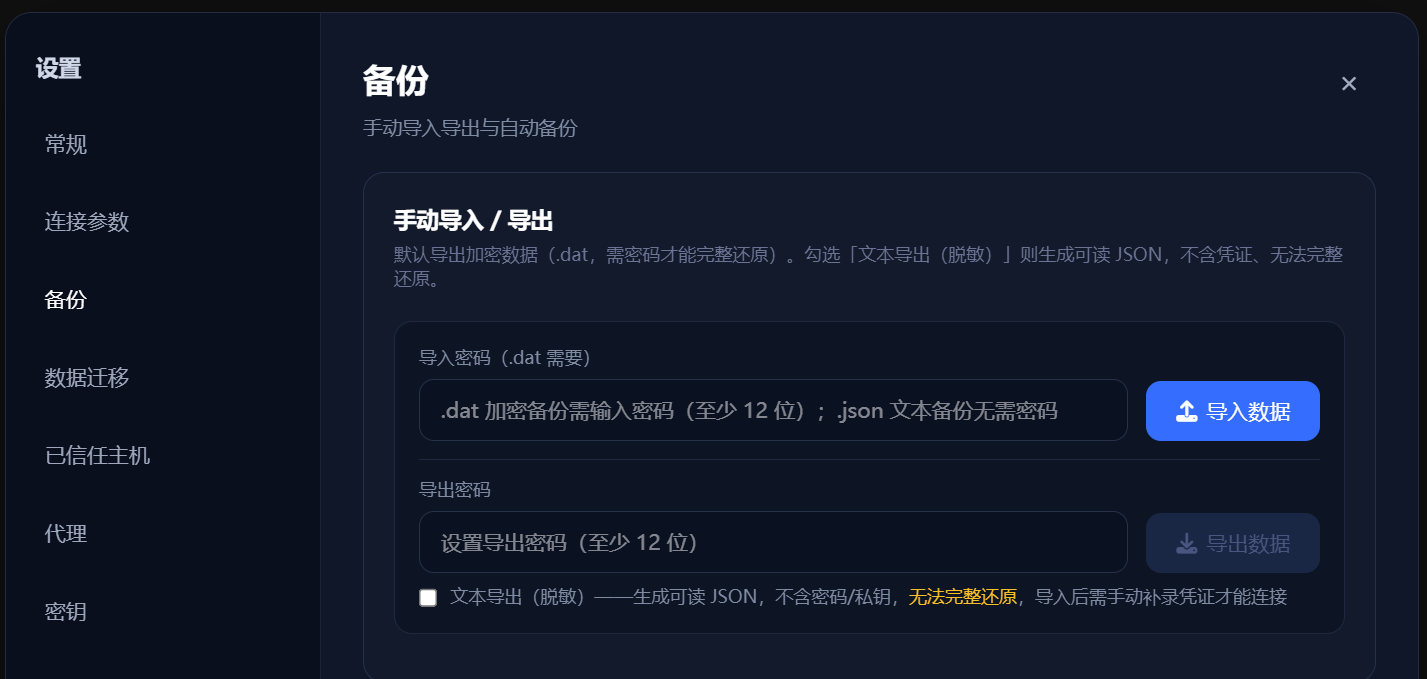
Open Settings → Backup.
Steps
- Encrypted backup: choose encrypted export and set a password. The same password is required for import; remember it, because a forgotten password cannot restore the backup.
- Text export: create a readable file for review or sharing. It excludes credentials and therefore cannot fully restore application state.
- Import: select a backup file, enter the encrypted-backup password when prompted, and review the import result.
- Automatic backup: choose the local folder and interval offered by the current UI, then check periodically that files are being created.
Know Before You Use It
- Encrypted backups may contain sensitive data. Restrict access to the files and protect the password.
- Text exports omit passwords, private keys, and tokens. Treat them as partial configuration exports, not full backups.
- Automatic backups are local-only. The actual scope is the set of options shown in the current UI; do not assume every application datum is included.
Failure Handling and Safety
If import fails, check that the file is intact, the password is correct, and the versions are compatible. Avoid repeatedly overwriting existing settings. Keep backup files out of public folders and verify their source before importing.